
Core Technology for Building Dark Factories that Produce Knowledge Work Without Humans in the Loop
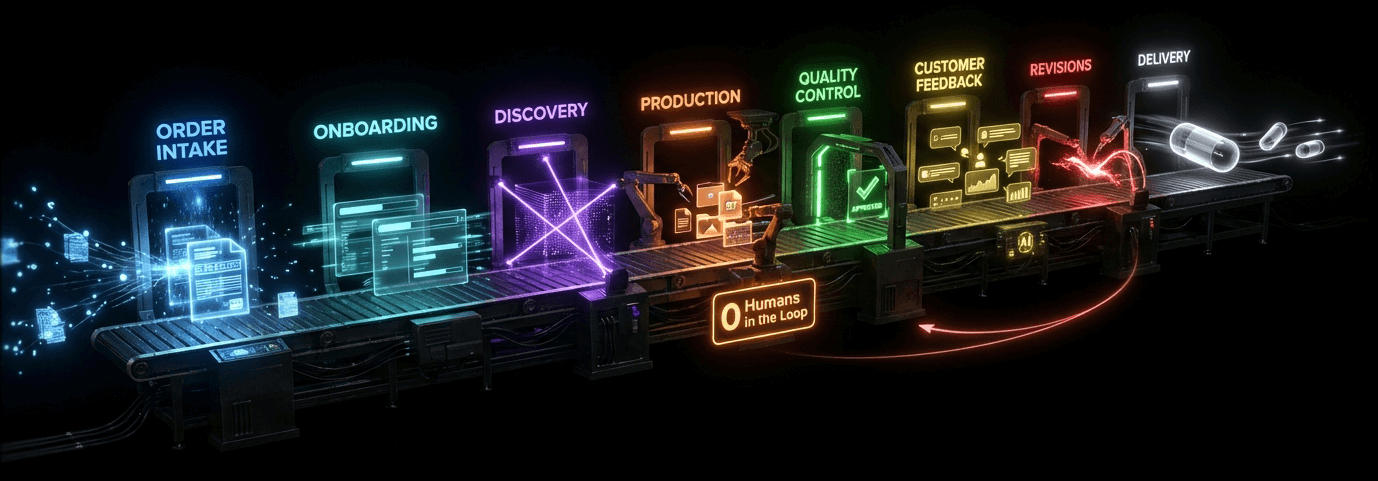
Transform any business into a fully autonomous operation. From order receipt to delivery—powered by a dark factory that never sleeps
Automate Complex Human Workflows witha Single Prompt
Tell the Autonomous Solutions Architect what to do...
Prompt
Create a reusable, automated workflow based on this existing SOP:
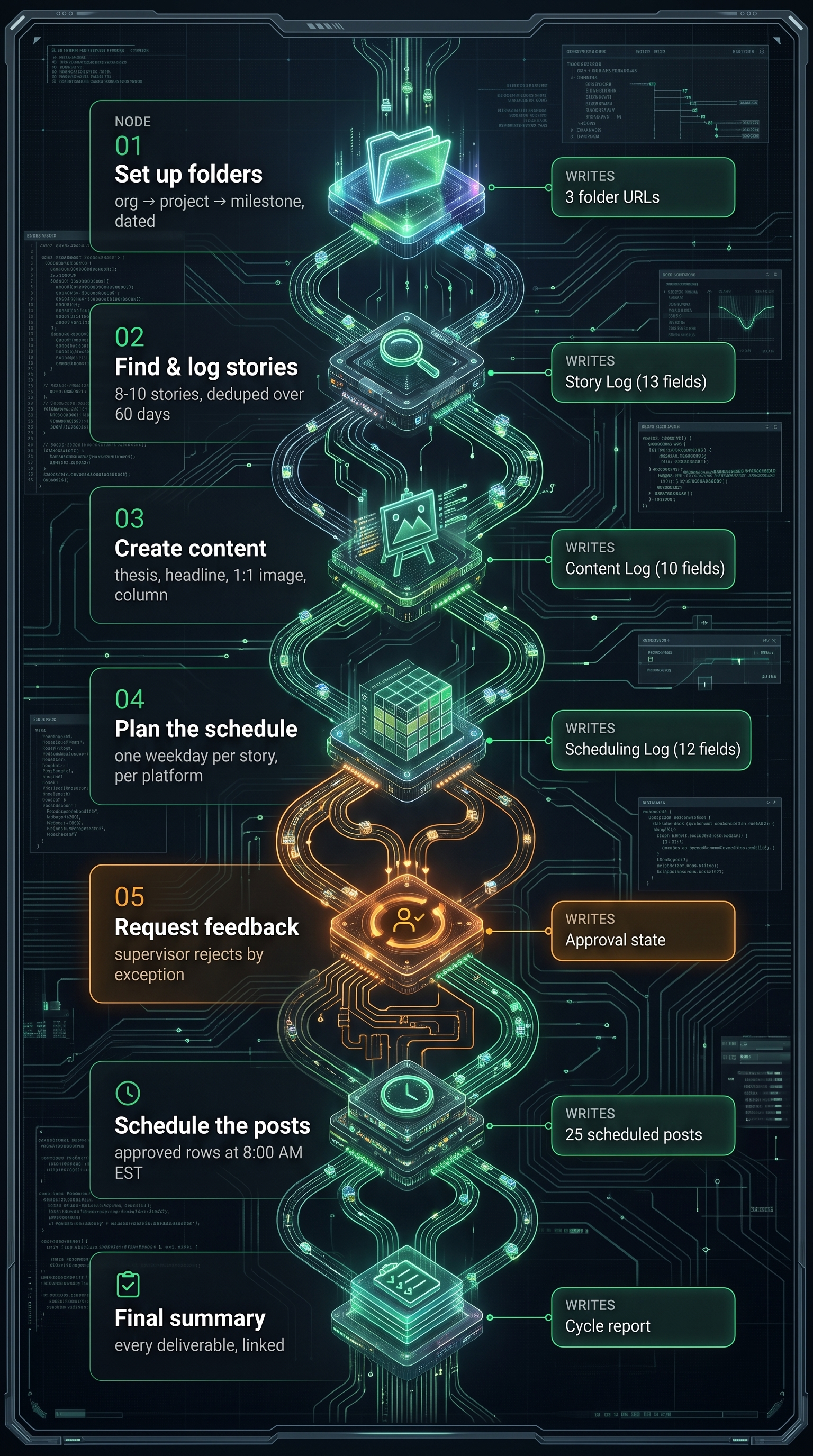
Step 1 · Set Up Folders
- Rename this milestone by adding today's date (YYYY-MM-DD) as a prefix to the existing name.
- Make sure the organization has a shared drive folder. If not, create one and save the URL to the org folder field.
- Make sure the project has a subfolder under the org folder. If not, create one named after the project and save the URL to the project folder field.
- Make sure this milestone has a subfolder under the project folder. If not, create one named after the milestone and save the URL as the milestone folder.
- Confirm with your supervisor when done.
Step 2 · Find and Log Stories
- Find the Expert Profile document in the org folder. Search for 8–10 recent stories from the past 7 days using the story themes from Section 4 of the Expert Profile.
- Find the Story Log spreadsheet and add each story as a new row with its Story_id, dates, source, working URL, verbatim title, story details, topic, duplicate check, scores, and Content_status set to "No_content_yet."
- Mark each story exactly "Unique" or "Duplicate." A duplicate matches an existing URL or headline, or covers the same event from the past 60 days.
- For each Unique story, score Relevance, Newsworthiness, and Overall_Score as Relevance × Newsworthiness. Leave scores blank for duplicates.
- Prepare a report with totals and the top five Unique stories ranked by Overall_Score, with Relevance as the tie-breaker.
Step 3 · Create Content for Top Stories
- Select up to five Unique stories with No_content_yet and Overall_Score ≥ 48, prioritizing newly added stories and ranking by score.
- Create a subfolder named Weekly-Content-[YYMMDD] under the milestone folder.
- Using the Expert Profile and source URL, lock a thesis, then create an eight-word-max headline, a square image, a 400–650 word first-person caption, and 3–5 CamelCase hashtags.
- Add each selected story to the Content Log with sequential Content_ID, Post_type "Image," caption, hashtags, and shareable Media_url. Leave approval and scheduling fields blank.
- Update only Content_status to "Content_created" in the Story Log, then report the content folder, Content Log, and each story's deliverables.
Step 4 · Plan the Posting Schedule
- List active social accounts for the organization, excluding YouTube and TikTok.
- Select all content created in Step 3 where Schedule_planned is blank.
- Assign each story a distinct weekday in the next complete Monday��Friday week, ranked Monday through Friday.
- Adapt each caption and hashtag set for X, Pinterest, LinkedIn, Instagram, and Facebook without repeating the headline in captions.
- Copy the Template Scheduling Log into the content folder, add one row per story per platform, and verify unique Content_ID + Platform combinations, shared dates, distinct weekdays, and the expected row count.
- Update Schedule_planned with the assigned date and report additions, skips, dates, and the Scheduling Log link.
Step 5 · Request Feedback on the Schedule
- Send the Scheduling Log to your supervisor and explain that posts will go out as scheduled unless they take action.
- Ask them to identify Content IDs for changes or mark rows "Rejected" in Approval_status.
- Wait for supervisor approval before proceeding.
Step 6 · Schedule the Posts
- Process only Approved rows whose post_status is not already Scheduled. Skip rejected or blank approvals.
- Schedule eligible posts at 8:00 AM EST on their Scheduled_date. Never publish immediately or move a missed post.
- Use the headline, adapted caption, hashtags, media URL, and Pinterest Board where applicable.
- Update each row to Scheduled or Failed and report scheduled, failed, and skipped posts with reasons.
Step 7 · Final Summary
Prepare a summary report of all deliverables, with links to the folders, logs, content, and schedule.
Converts any existing training doc or SOP into an agentic workflow...
Enhanced Enterprise Security
Security is built into EVERY LAYER of the Digital Dark platform—from identity and permissions to data isolation, integrations, and operational resilience.
Authentication-Auth0 (OAuth 2.0 / OIDC) with per-environment custom domains.
Authorization-Role-based access control settings are evaluated per request and scoped to organization, project, and task level.
Data isolation-Every database query is automatically scoped to the authenticated user’s company, preventing cross-tenant exposure regardless of the query path.
API gateway-A session-validating proxy sits between browser clients and AI services; there is no direct backend access.
Service-to-service auth-Dedicated bearer tokens secure communication between internal services.
Feature gating-Company- and user-level controls determine available capabilities for granular rollout and access management.
Workspace integration security-Google Workspace and Microsoft 365 connections use OAuth 2.0 consent flows with least-privilege scopes; credentials are never stored in the application layer.
Encryption-Data is encrypted in transit with TLS and at rest across all storage layers.
Automated backups-Continuous database backups support point-in-time recovery.
Audit logging-All administrative and data access activity is tracked through cloud-native audit logs.
Teams can perform AI-related work within a governed platform, reducing unauthorized AI usage and helping protect sensitive data.
Selective Skill Assignment
Select skills for each Dark Agent to restrict user-access to agentic capabilities and scope token burn per role
Dark Agents®
Dark Agents operate when the system is in LightsOut™ mode, where no Humans are in sight. Dark Agents operate autonomous, end to end, and continuously, without human intervention. Like the "lights-out" factories of manufacturing, your digital operations run without ceasing; processing orders, managing workflows, and delighting customers around the clock.
LightsOut™ Mode
LightsOut Mode represents true autonomous operation—where your business runs entirely without human intervention. In LightsOut Mode, Dark Agents work independently from start to finish, making decisions, handling exceptions, and delivering results while you focus on strategy. Contrast this with Lights-On Mode, where humans remain in the loop for approvals, oversight, or manual handoffs. LightsOut Mode eliminates these bottlenecks, enabling your business to operate at machine speed with complete autonomy.
Learn more about Dark Agents, LightsOut Mode, and other key concepts in our Dark Factory Glossary.
Scale at Machine Speed
By removing humans from the loop, Digital Dark Factories achieve unprecedented scale that was previously impossible. Without waiting for human input, approval, or oversight, autonomous agents can process thousands of tasks simultaneously, operating continuously at machine speed. This eliminates the fundamental bottleneck of human capacity—where traditional workflows must pause for decisions, reviews, or handoffs. The result is exponential scalability: what once took days or weeks of human coordination now happens in minutes or hours, with perfect consistency and zero degradation in quality regardless of volume.
Create Proprietary Intellectual Property
As a Digital Dark Licensee, every tool, workflow, and agent your builder constructs belongs to your organization. As our builder agent designs and assembles the custom execution tools your factory requires—API integrations, specialized agents, automation logic—this becomes codified IP that compounds in value over time. Unlike off-the-shelf software, your dark factory is uniquely yours: a competitive moat built from your processes, your data, and your operational knowledge, permanently owned and continuously refined.
End-to-End Automation
From order receipt to final delivery, AI agents handle every step of your business process autonomously.
24/7 Operations
Your business never closes. Orders processed, customers served, and operations running while you sleep.
Infinite Scalability
Handle 10 orders or 10,000 without adding headcount. Scale instantly to meet demand.
Zero Human Error
Consistent, precise execution every single time. No sick days, no mistakes, no variability.
Radical Cost Efficiency
Eliminate operational overhead. One dark factory replaces entire teams at a fraction of the cost.
Instant Deployment
Deploy your dark factory in days, not months. No complex integrations or IT projects required.
See Immediate Value
See how your people are using AI. See who is using AI and who is not. See AI operation costs per project, task and iteration. See immediate proof of value for any AI operation. See clearer ROI.
Future Proof
AI models improve every month. For most businesses, that means constant research — evaluating new releases, migrating workflows, tuning cost against capability, and hoping nothing breaks. The better AI gets, the more work it takes just to keep up.
Digital Dark eliminates that entirely. Already paying for Claude or ChatGPT subscriptions? They work seamlessly with the platform — but you're never dependent on any single provider. Digital Dark automatically selects the right model for each task, optimizes cost without sacrificing intelligence, and upgrades as better options become available. No research, no migration, no maintenance.
Your team builds the workflow once. We handle everything underneath.
Ready to Go Dark®?
Join forward-thinking businesses running autonomous operations 24/7. Deploy in days, scale infinitely, and leave competitors in the dark.
Pricing inquiries: pricing@inspira.ai
Digital Dark® - Where Business Never Sleeps